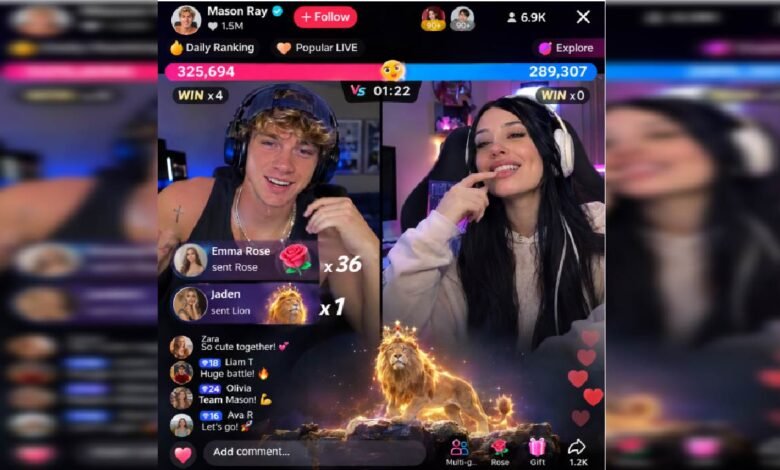
A LIVE broadcast is a shared experience, but viewers do not all participate in the same way. Some may watch with the sound turned low, others may join while a demonstration is already under way, and some may prefer reading comments rather than contributing to the conversation. A thoughtful creator considers these different viewing habits when planning a session.
Understanding how to go live on tiktok is only the beginning. Making the broadcast clear, welcoming and comfortable to follow is what helps turn a simple stream into a worthwhile experience. Small decisions about speaking, presentation and interaction can make a noticeable difference without requiring expensive equipment or elaborate production.
Make the Subject Clear Before You Begin
Viewers should be able to understand the purpose of a broadcast without having to guess. Choose a topic that can be explained in a sentence and consider what someone watching will learn, see or discuss. For example, a creator interested in home organisation might plan a session around arranging a small desk rather than discussing every aspect of interior design. A more focused subject makes it easier to communicate the main idea and gives viewers a clear reason to follow along.
Think about the information someone needs before the demonstration or discussion begins. Introduce unfamiliar terms, explain the context and avoid assuming that everyone has watched your previous videos. A little preparation can make the session more welcoming to people discovering your content for the first time.
Explain What Viewers Cannot Easily See
When demonstrating a process, remember that viewers may be watching on small screens or may not be able to distinguish every detail. Do not rely entirely on visual information. Describe important actions as you perform them. If you are showing how to arrange a photograph, explain which part of the image you are adjusting and why. If you are demonstrating a craft technique, describe the materials and the movement involved.
Keep visual demonstrations uncluttered. Too many objects, overlapping activities or frequent changes in camera position can make it difficult to understand what matters. Move the camera only when doing so helps viewers see something more clearly. These habits are particularly useful when your subject involves small details, written information or several steps. Clear explanations allow people to follow the process even when they cannot see every movement perfectly.
Use Speech and Pacing to Support Understanding
Speaking clearly does not mean speaking unnaturally slowly. It means giving viewers enough time to understand each point before moving on. Try dividing complicated explanations into smaller sections. Introduce one idea, provide an example and then move to the next. When you change subjects, briefly explain the connection so the conversation does not feel abrupt.
Pay attention to audio quality as well. Background noise, distant microphones and inconsistent volume can make a broadcast tiring to follow. Choose a reasonably quiet environment and test your sound before starting. If you use unfamiliar names, technical expressions or abbreviations, explain them in everyday language. A creator who communicates clearly is more likely to make new viewers feel included, even when the subject is specialised.
Offer Different Ways to Participate
Not everyone wants to speak or comment during a broadcast. Some viewers may be comfortable asking questions, while others prefer to observe quietly. A welcoming session makes room for both. Ask questions that people can answer without sharing personal information. For instance, a cooking creator might ask which ingredient viewers would like to see used in the next demonstration. A book discussion could invite people to share a favourite genre.
Give viewers time to respond rather than immediately repeating a question. Acknowledge useful contributions and explain when you are moving on to another subject. Avoid treating comments, follows or gifts as proof that someone is enjoying the session. People can find a broadcast valuable without taking any visible action. Keeping participation voluntary creates a more relaxed environment.
Think About Comfort, Privacy and Moderation
When learning how to go live on tiktok, creating a welcoming broadcast also requires sensible boundaries. Check the background before starting and make sure that private documents, contact details and personal addresses are not visible. If another person appears on camera, consider their privacy and obtain appropriate permission. Review the moderation and safety controls available through TikTok. Depending on your account and current feature availability, you may have options to manage comments or restrict disruptive interactions. Familiarise yourself with these controls before they become necessary.
Avoid turning disagreements into public arguments. You can acknowledge a different opinion without allowing the discussion to become hostile. Follow TikTok’s Community Guidelines and use the available tools when comments become inappropriate. Creators who need additional guidance may also explore TikTok LIVE Creator Networks. Depending on programme availability and eligibility, these networks may offer support related to LIVE activities. Review the services, terms and commitments before joining. Participation does not guarantee access, audience growth or earnings.
Review the Experience From a Viewer’s Perspective
After a broadcast, consider how easy it was for someone unfamiliar with your content to follow the session. Could they understand the subject? Were important actions explained? Did the pace leave enough room for viewers to absorb the information? You could also review your own notes or any available performance information. Look for recurring questions that suggest an explanation needs improvement. If several viewers ask for the same detail, consider giving it more attention in a future session.
Make one or two practical adjustments rather than changing everything at once. You might simplify an explanation, improve the camera angle or leave more time for questions. These small improvements can gradually make your broadcasts more accessible and enjoyable.
Conclusion
A useful LIVE broadcast is not defined solely by its topic or the number of people watching. Clarity, comfortable pacing, thoughtful demonstrations and respectful participation all help shape the viewer experience. As you learn how to go live on TikTok, consider the session from the audience’s point of view. Explain what you are doing, make room for different viewing habits and maintain sensible boundaries. A clear and welcoming approach can help more people enjoy the conversation without making the production complicated.
FAQs
How can I make a LIVE demonstration easier to understand on a small screen?
Keep the main subject visible, avoid unnecessary camera movement and describe important actions aloud. Use simple explanations when showing details that may be difficult to see.
Should I repeat information for viewers who join halfway through?
Brief summaries can help new arrivals understand the topic. You do not need to restart the entire discussion; simply explain the current subject when it feels natural.
What can I do if viewers have different levels of knowledge about my topic?
Explain essential terms, use practical examples and avoid assuming everyone has the same experience. This makes the session more approachable for beginners while still offering useful information to regular viewers.
How can I encourage participation without making viewers uncomfortable?
Ask relevant, optional questions and give people time to respond. Avoid demanding comments or personal details, and remember that some viewers prefer to watch quietly.
Does a more accessible LIVE broadcast require professional equipment?
No. Clear speech, sensible camera positioning, suitable lighting and a quiet environment can improve the experience. Focus on understandable communication before investing in more equipment.