A phone that charges only when the cable is propped at forty degrees is telling you the fault is physical, and it sits in one of three places: the cable, the charger, or the port inside the phone. The order that settles it fastest is also the order of cost. Swap the cable, then the charger — both are cheap to test and cheap to replace — and only then turn to the port, where the fix runs from a free clean to a paid repair. Working through them in that sequence takes ten minutes and avoids the two expensive mistakes: replacing a charger that was fine, and booking a repair for a port that only needed cleaning. Most ports are blamed before they are tested, which is why the order matters more than the suspicion.
Working Out Which End Is at Fault
Swap One Thing at a Time
Swap one thing at a time, and note what changed. The order that saves the most time is cable first, then charger, because each is cheaper to test than the next. A different cable on the same charger tells you whether the lead is at fault; the same cable on a different charger tells you whether the brick is. Only when both have been eliminated does the phone’s own port become the answer. Guessing skips that sequence and usually lands on the wrong component. Ten minutes with one known-good cable and one known-good charger settles more than an hour of reading about charging standards.
The Wiggle Test and What It Shows
The wiggle test is the quickest way to confirm it. Start a charge, then move the plug gently while watching the percentage: a rate that jumps, stops or restarts as the connector moves points at a contact problem rather than at software. This is why so many iphone chargers are blamed for a fault that sits in the socket. A phone that charges reliably on a table but not in a pocket is telling you the same thing, since the only difference between the two is movement. Software faults do not care about angles. If the percentage holds steady while the plug is moved, the port is not the problem and the search moves elsewhere.
When the Charger Itself Has Failed
How Chargers Actually Fail
Chargers do fail, just less often than cables, and usually in one of three ways. The components inside age: capacitors dry out over years of heat cycles, and the output begins to drift long before it disappears. The physical parts wear: pins bend, and the solder joints where the plug meets the shell crack after years of insertion and removal, so a charger that sat firm last year wobbles in the socket this year. And the failures that end things outright — a surge on the line, a plug yanked from the wall by its lead — are rarer but final. The signs are worth knowing: no light where there was one, warmth that has turned hot, an output that comes and goes with the position of the brick, or a smell of hot dust that was never there before. A charger showing any of them has earned retirement rather than a second chance.
Replacing It with Something You Trust
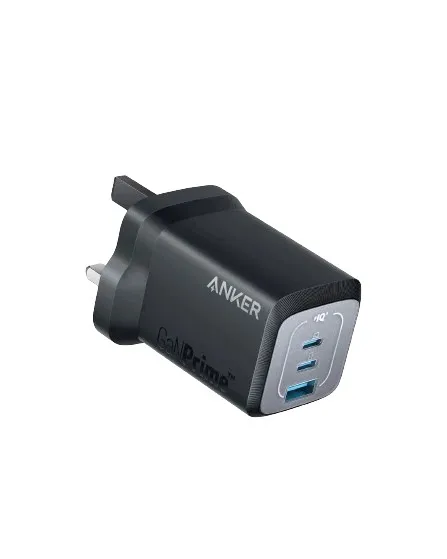
A failed charger is replaced rather than repaired — the case is sealed, and the labour costs more than a new unit. What matters is choosing the replacement well: enough power for the heaviest device in the house rather than the lightest, USB-C Power Delivery and PPS so the phone negotiates its charge properly, and temperature cut-offs backed by a certification mark rather than a claim. A replacement that clears all three is Anker’s Prime 67W GaN Wall Charger: 67 W from a single port, GaN internals that keep the body small, and thermal protection that lets it run at full output without drama. It doubles as the known-good reference for the tests above, so a phone that still charges only at an angle on a brand-new supply points the diagnosis firmly at the port.
When the Port Is the Problem
Cleaning the Port
If the cable and charger work reliably with other devices, the iPhone’s charging port may be obstructed by debris. Pocket lint, dust and fabric fibres can accumulate inside the socket over time, preventing the connector from seating fully and making charging intermittent. Shine a flashlight into the port to check for visible buildup, particularly near the back of the socket. Before cleaning, disconnect the cable and turn off the phone. Hold the phone with the port facing downward and use a soft, dry brush to gently remove loose debris, working outward without pressing against the contacts. Avoid metal tools, liquids and compressed air, which can damage the connector or push debris further inside. If the buildup is compacted or difficult to remove, have a technician clean it rather than forcing it out yourself.
When Cleaning Is Not Enough
If the port is clean but the cable still feels loose or charging stops when the connector moves, the port may have worn or damaged contacts—repeated plugging, accidental pulls and impacts weaken it over time. If the same problem occurs with several cables, the port likely needs professional inspection. A port repair is often more practical than replacing the phone, especially when the device is otherwise sound; a technician can assess whether it needs cleaning, repair or replacement and quote before proceeding. In the meantime, a compatible wireless charger can serve as a temporary alternative. Replacing the phone makes sense only if other problems or repair costs outweigh the fix.
Conclusion
Swap the cable, then the charger, clean the port before you judge it, and only then treat a still-loose connector as a repair. The angle trick is a symptom, never a solution. The whole sequence takes less time than the queue at a repair counter, and it prevents the slow decline into charging the phone at one precise angle on one particular table. A port cleaned once a year rarely reaches the stage where it needs replacing at all.